Energy Pass
Stop paying for every transfer. Energy Pass is a monthly plan: you pay once from your TRONAgg balance and get an Energy allowance every day for the whole period. Every order you place draws on today's allowance first, so the Energy is already paid for:
- Any address, any number of orders. Send Energy to your own wallets, your customers' or your colleagues'. The pass is tied to your account, not to an address.
- Works everywhere you buy. The workspace, the API and the TRONAgg Telegram bot all use the same allowance. You don't change anything in your integration.
- Refills every day at 00:00 UTC. Unused Energy does not carry over to the next day.
- Cheaper than buying order by order. Each plan shows its pay-as-you-go value next to its price, so you can see the saving before you pay.
The plans, prices and amounts in the screenshots below are examples. The plans on offer and their current prices are always on the Energy Pass page in your workspace.
1. Choose a plan
Sign in at tronagg.ai/workspace and open Energy Pass in the Automation section of the sidebar, or go straight to tronagg.ai/workspace/energy-pass.
Every plan card answers the same questions:
- Energy every day: your daily allowance, and roughly how many USDT transfers it covers (one transfer to a wallet that already holds USDT uses about 65,000 Energy).
- Price per period: what you pay for 30 days, and what that comes to per day.
- Pay-as-you-go: what the full allowance, used every day of the period, would cost at your current Energy price, and the saving the plan gives you.
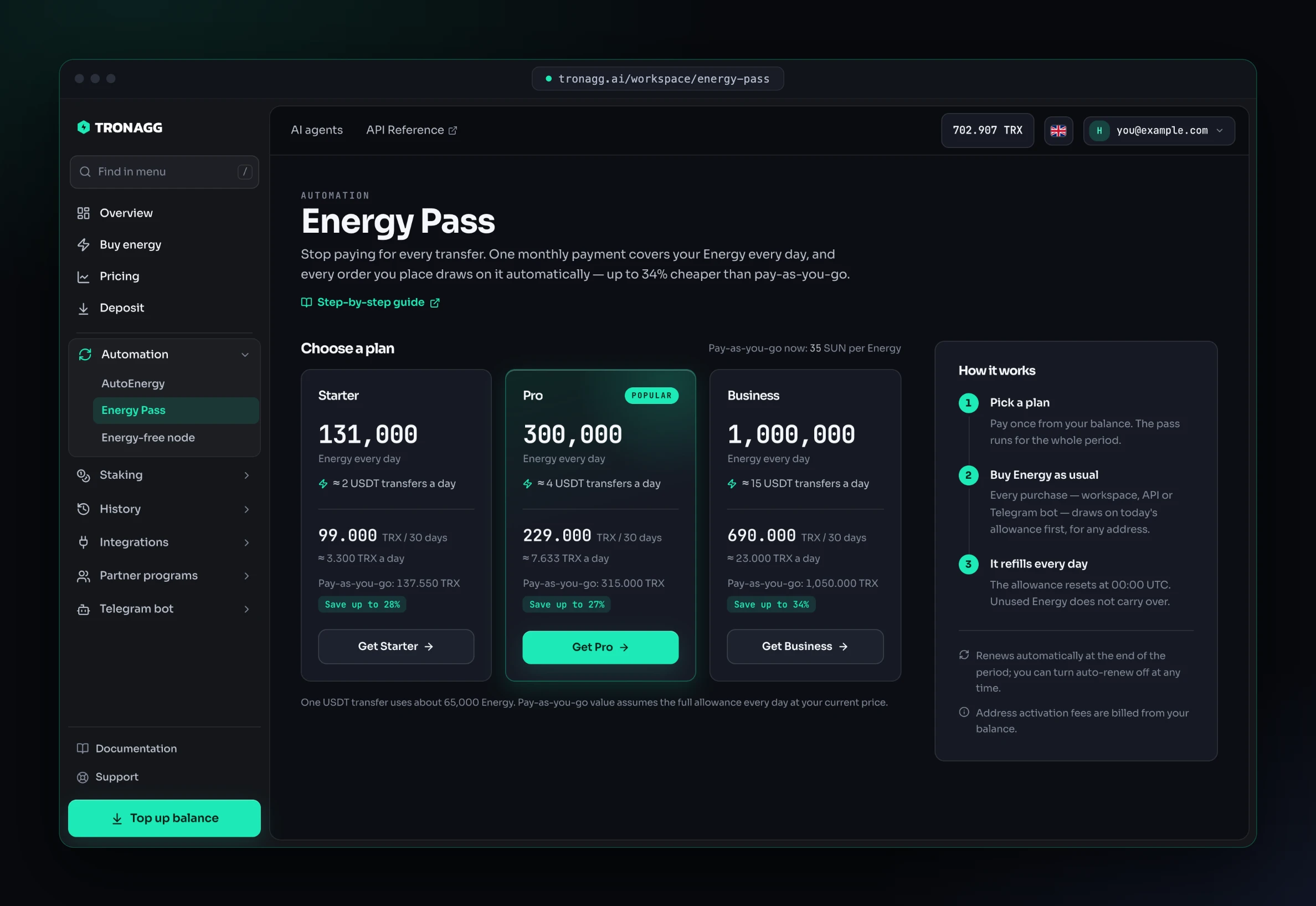
Pick the plan that matches a typical day. If a day needs more than your allowance, the rest is simply billed from your balance at your normal price (see Bigger orders are split).
2. Pay for the pass
Click the plan's button. The confirmation shows the daily allowance, the period and its end date, the amount charged now, and your balance before and after.
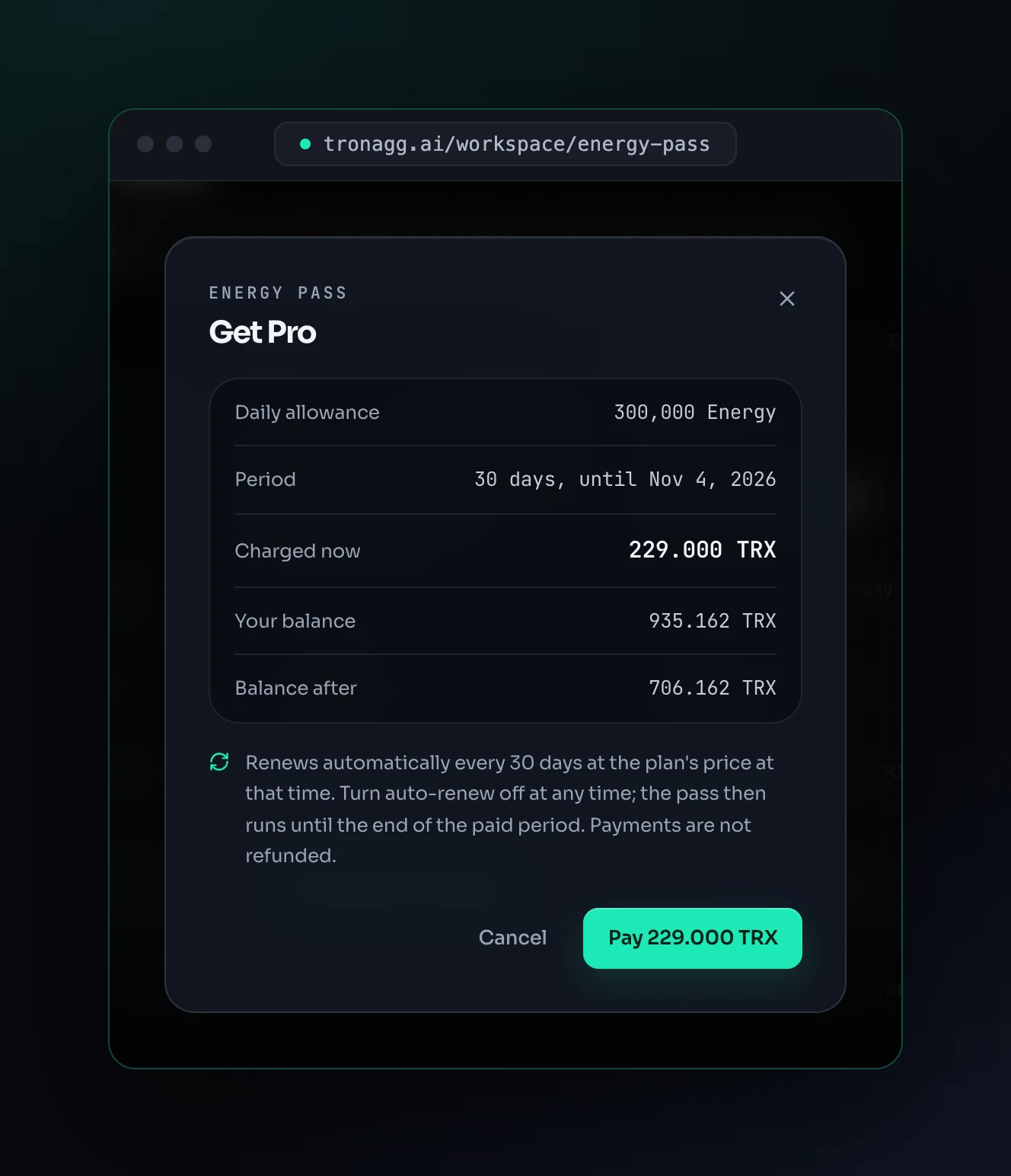
Click Pay and the pass starts immediately, with today's full allowance. If your balance doesn't cover the price, the dialog shows how much to top up and links to Deposit instead.
3. Your pass at a glance
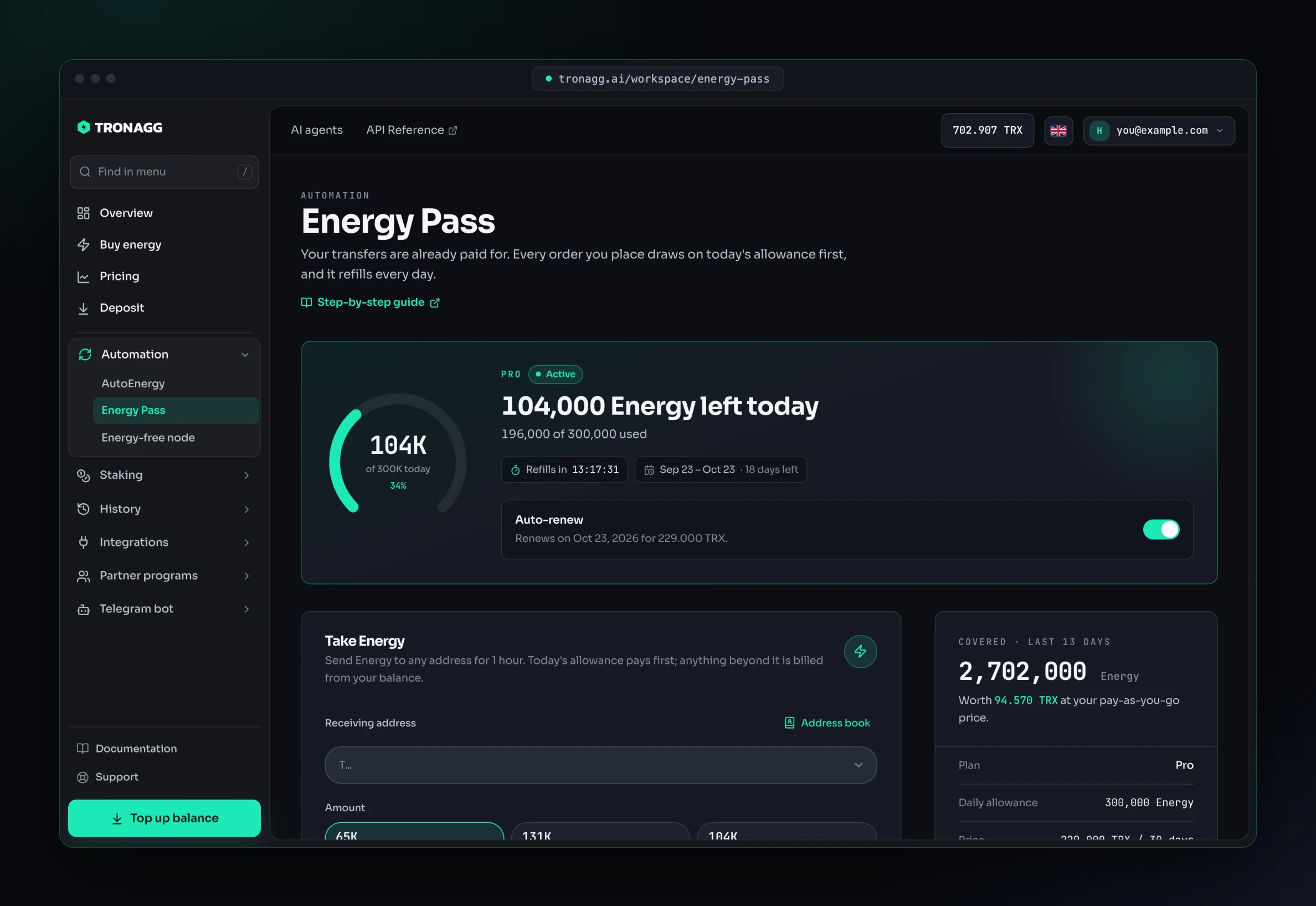
Once you have a pass, the page shows how much Energy is left today, when the allowance refills, the dates of your period and whether the pass renews.
4. Take Energy
You don't need to do anything special to use the pass: every balance purchase draws on it first. Use whichever way you already buy Energy.
From the Energy Pass page
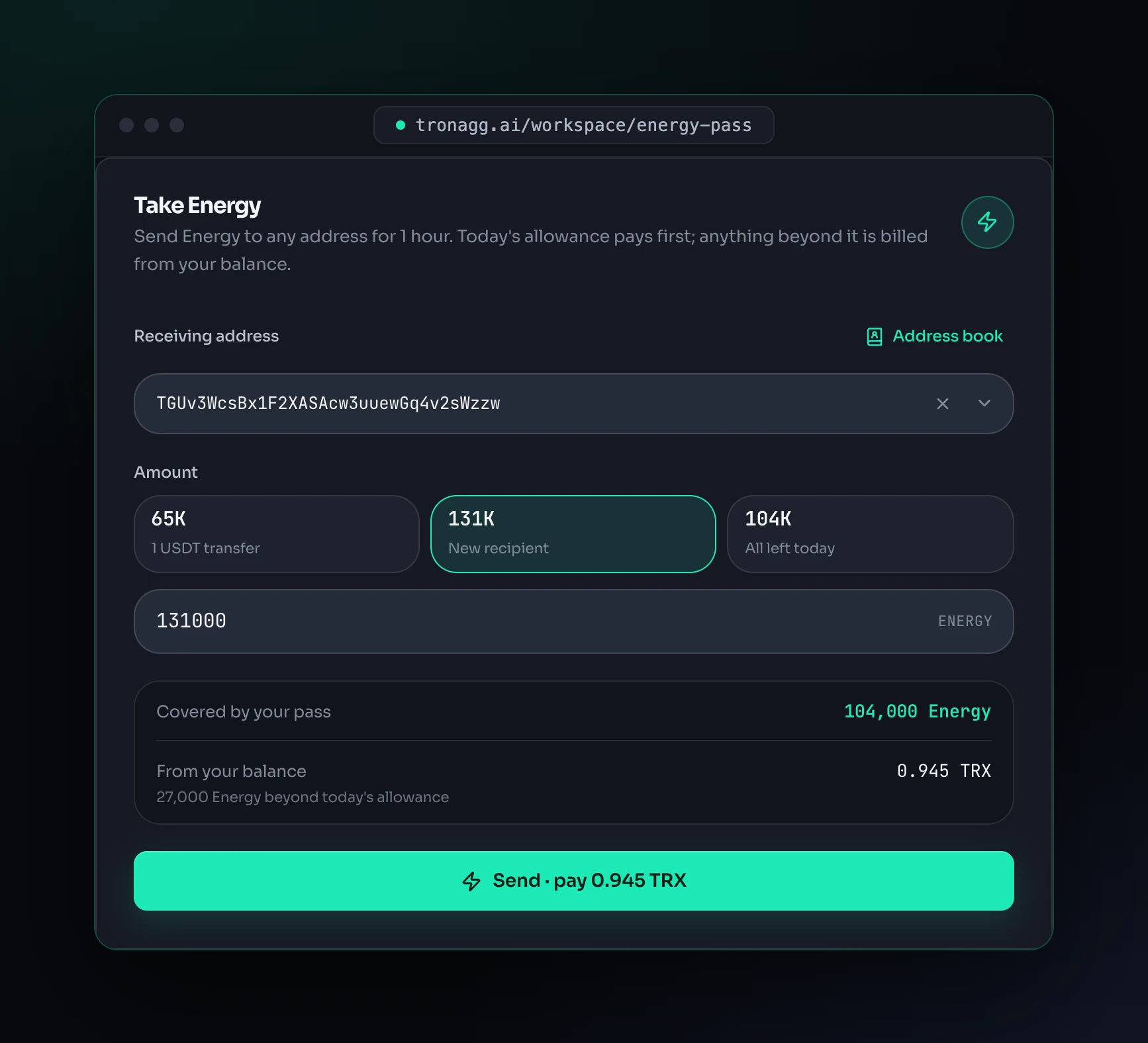
The Take Energy card sends Energy to any address in one step. Enter or pick the receiving address, choose an amount (one transfer, a new recipient, or everything left today) and check the breakdown before you send:
- Covered by your pass: the Energy today's allowance pays for.
- From your balance: what is billed for anything beyond it.
On the Buy page
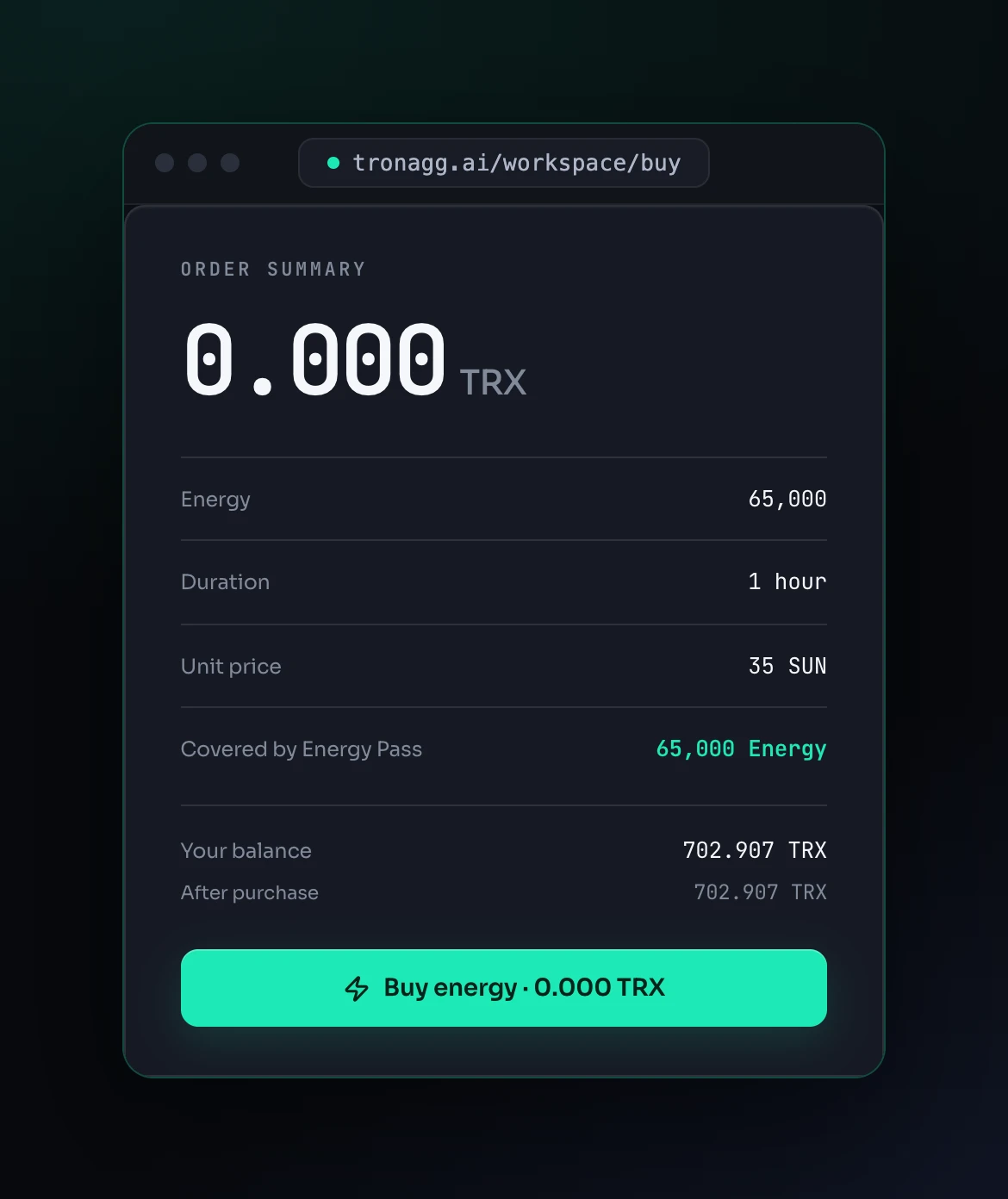
The order summary shows how much Energy your pass covers and the total you pay after it. In this example the whole order fits in today's allowance, so it costs nothing.
Through the API
POST /api/v1/buy works exactly as before. The pass applies automatically, and the response tells you how much of the order it covered:
{
  "order_id": "0b7f3c52-9d1e-4a8b-b2f4-6c1e8a3d5f90",
  "status": "pending",
  "total_price_sun": 0,
  "total_price_trx": "0",
  "activation_fee_sun": 0,
  "balance_after_sun": 702907500,
  "energy_pass_energy": 65000
}
energy_pass_energy: the Energy your pass paid for.total_price_sun: what your balance paid for the rest, plus any activation fee.
GET /api/v1/estimate returns the same energy_pass_energy field, so you can show your users the real price before they buy.
In the Telegram bot
The bill shows ⚡ Energy Pass covers: N Energy and a total for the rest. If your allowance gets used somewhere else before you confirm (for example by an API order), the bot doesn't charge you more than the bill said: it asks you to open a fresh one instead.
Bigger orders are split
If an order needs more Energy than you have left today, it is not rejected. Today's remaining allowance covers part of it, and the rest is billed from your balance at your normal price. It is still one order and one delivery to the receiver.
For example, with 104,000 Energy left today, an order for 131,000 Energy uses the 104,000 from the pass and bills the other 27,000. At 35 SUN per Energy, that's 0.945 TRX.
5. Track your usage
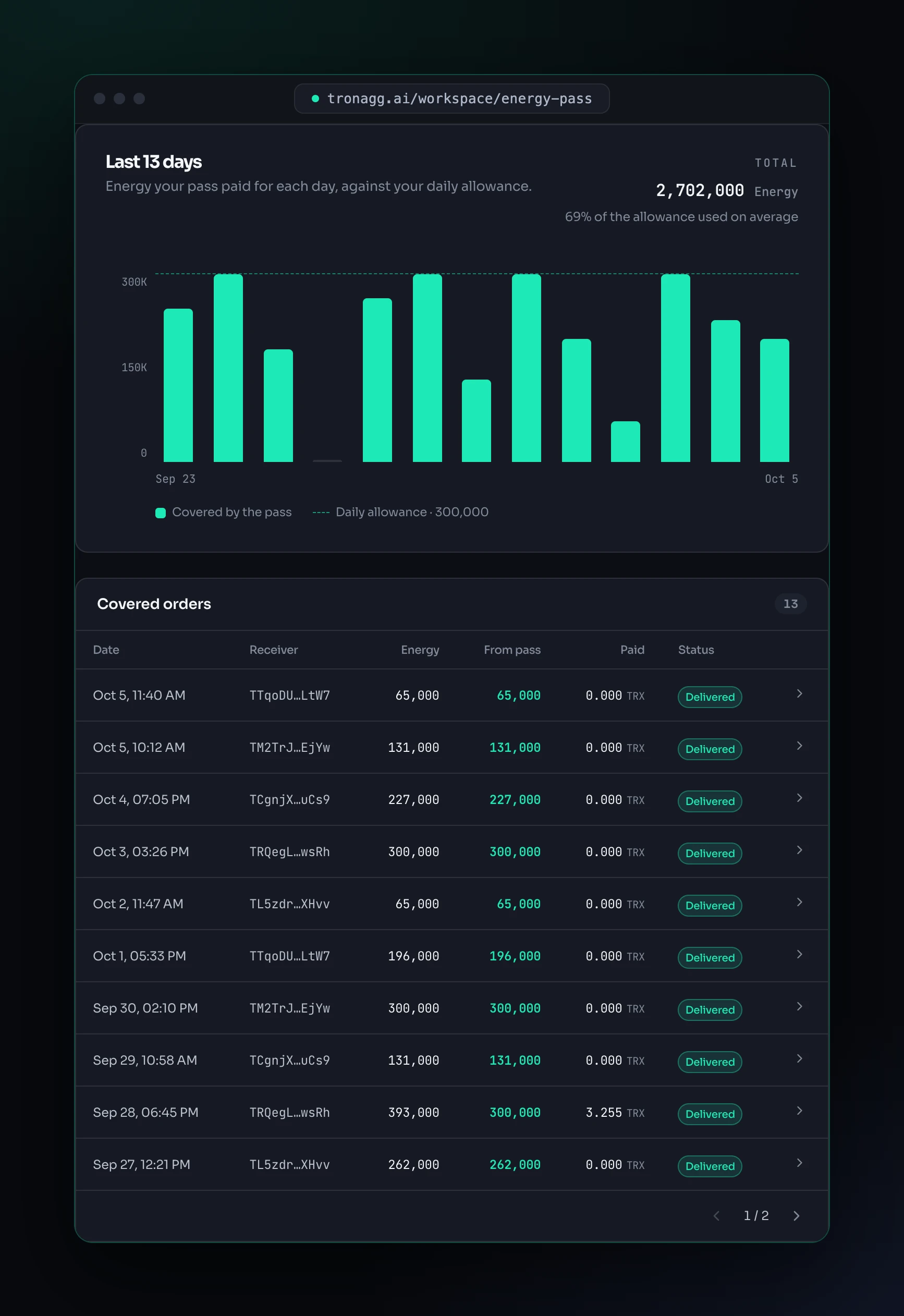
Further down the page you see how much of the allowance you used each day over the last 30 days, and every order the pass paid for: its total Energy, how much came from the pass, and what was paid from your balance.
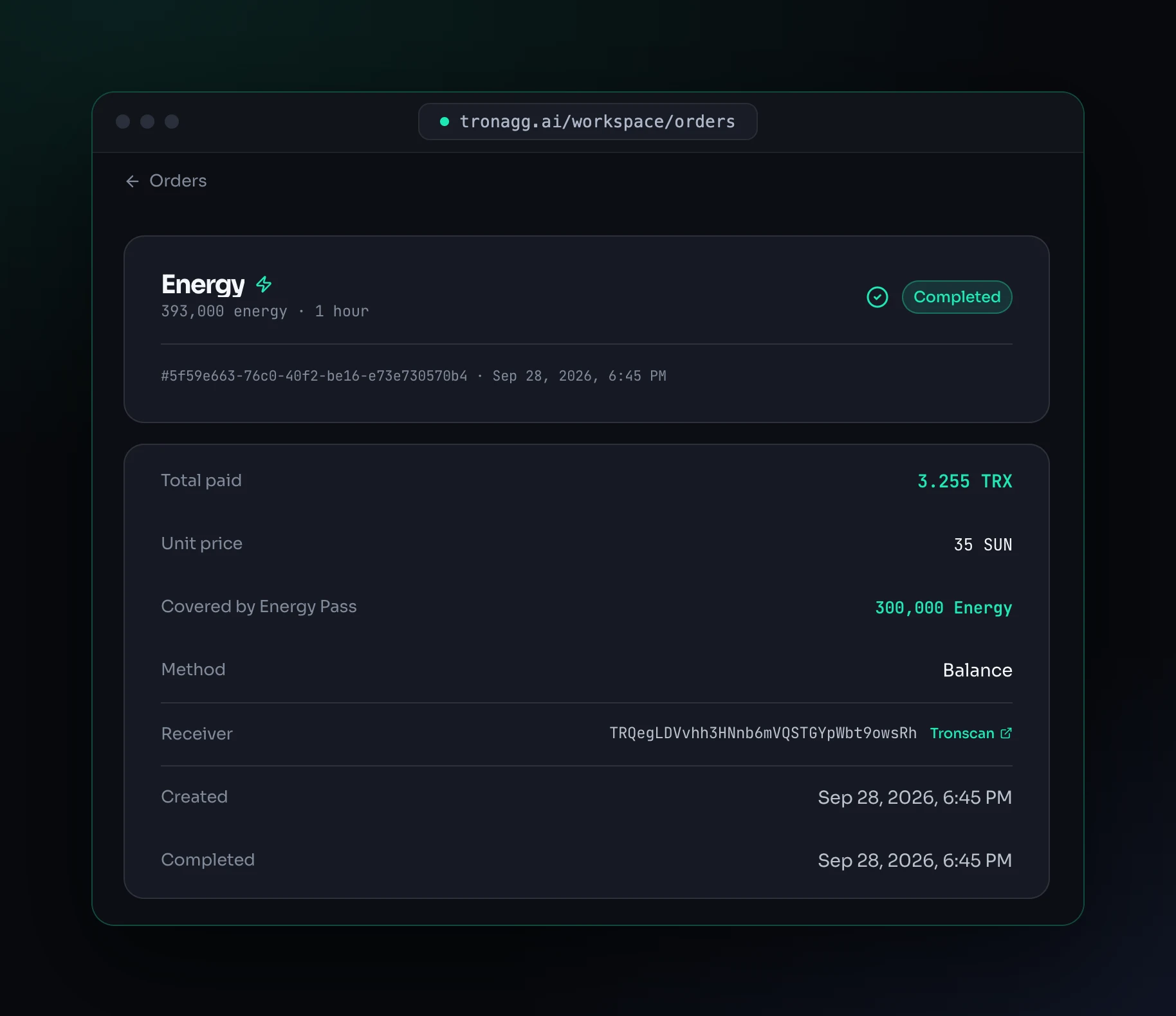
Each order's detail page shows how much of it the pass covered. The order below was split: 300,000 Energy from the pass and 3.255 TRX for the remaining 93,000.
In Transactions, pass payments appear as Energy Pass entries.
Renewal and cancellation
- Auto-renew is on by default. At the end of the period, the plan's price at that time is charged from your balance and a new 30-day period starts. The page always shows the next renewal date and price.
- Turning auto-renew off is how you cancel. The pass keeps working until the end of the period you paid for. Payments are not refunded.
- If your balance doesn't cover the renewal, the pass ends and you're notified with the amount needed. You can buy a new pass at any time.
- One pass at a time. To switch plans, turn auto-renew off and buy the new plan once the current period ends.
To be notified when your pass renews or ends, turn on the Energy Pass renewed and Energy Pass ended events in Workspace → Notifications, for Telegram or a webhook. Both are on by default for new channels.
FAQ
Does unused Energy carry over to the next day? No. The allowance resets every day at 00:00 UTC, whether you used it or not.
Can I send Energy to several addresses? Yes. The allowance belongs to your account, so any address and any number of orders count against it.
What is not covered by the pass? The one-time activation fee for an address that has never been used on TRON is billed from your balance. Sales made through Energy Agent are billed from your balance as usual: the pass covers your own purchases. Customers of a reseller's white-label bot can't buy a pass.
What happens if an order fails? The Energy it took from the pass goes back to your allowance for that day. Anything you paid from your balance for that order is refunded as usual.
Can I get a refund for the rest of the period? No. Turning auto-renew off stops future payments, and your pass keeps working until the end of the period you paid for.
Can I change my plan? Yes, once your current period ends: turn auto-renew off, and after the pass ends, buy the plan you want.