TRONAgg Radar
Every deposit seen. Every sweep ready. TRONAgg Radar watches your TRON addresses and tells you, in Telegram or by signed webhook, the moment USDT or TRX arrives or leaves. It warns you before a transfer would burn TRX, and tells you right after an address's security changes. Watching is free.
Where you want it, Radar also adds Energy for exactly the next transfer: when a deposit lands on an address you sweep, or after each transfer from a wallet that pays out. A USDT transfer with Energy costs a fraction of the TRX the network burns without it.
We never hold your keys or move your funds. Radar reads the public chain and, only where you turn Energy on, delegates Energy to your address. You sign and send every transfer yourself.
Start watching in the workspace · Get started in five minutes · See the use cases
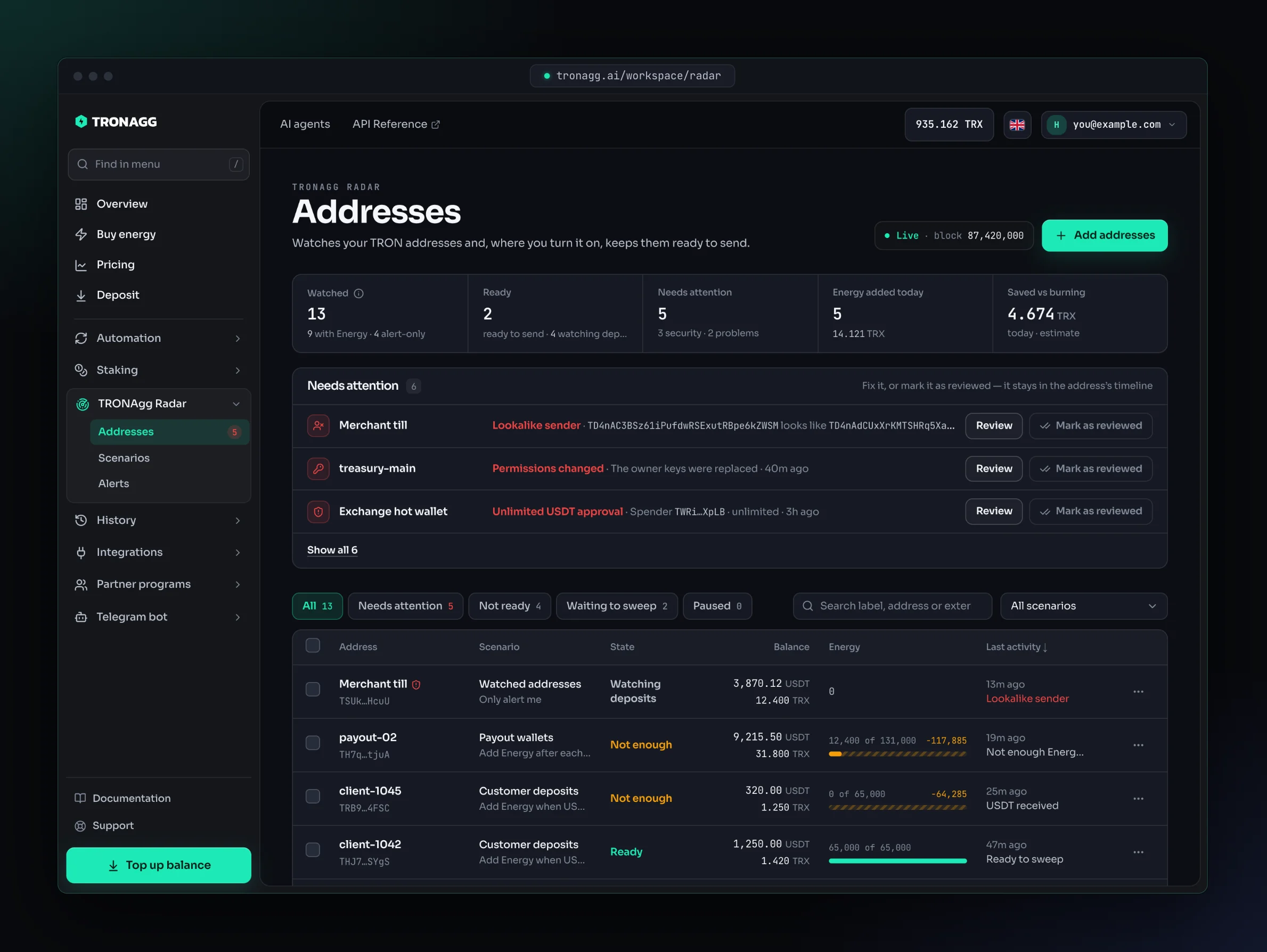
What Radar does for you
- Deposit alerts. Every USDT (from 1 USDT) and TRX (from 10 TRX) that arrives or leaves, usually within seconds of its block, including TRX sent by smart contracts (internal transfers).
- Ready to sweep. On a deposit address, Radar adds Energy when deposits reach your threshold and tells you Ready to sweep as soon as the address can send without burning TRX.
- Warnings before they cost you. Not enough Energy for the next transfer, not enough TRX for bandwidth, TRX burned on a transfer, a transfer that failed.
- Security alerts. Permissions changed, USDT approvals, USDT frozen by the issuer, lookalike addresses (address poisoning). On for every address, at no cost.
- One timeline per address. Every deposit, transfer, Energy addition and alert, with what Radar decided and where each alert was delivered. Kept for 90 days.
- An API and signed webhooks for all of the above, so you don't have to run your own TRON indexer.
Who it's for
- Exchanges, payment gateways and merchants with many deposit addresses: know when each payment lands, and sweep it for a fraction of the TRX burn.
- Payout and hot wallets that send USDT all day: Energy for the next transfer, and a warning before one burns TRX.
- Treasury and cold wallets: every movement and every security change, for free.
- OTC desks and teams: deposit alerts in your team's Telegram group, without writing code.
- Developers: signed webhooks and a replayable event feed instead of polling blocks.
Use cases walks through each one with the exact settings.
Three things a scenario can do
You put addresses into a scenario. A scenario does one thing for all of its addresses:
| Action | What Radar does | What you pay | Use it for |
|---|---|---|---|
| Only alert me | Watches and alerts. Never buys Energy. Energy warnings are optional and off by default. | Nothing | Treasury and cold wallets, watch-only addresses, deposits you only want to see. |
| Add Energy when USDT arrives | When deposits reach your threshold (100 USDT by default), adds Energy for one transfer, then tells you Ready to sweep. USDT already on the address doesn't count. | Each Energy addition, at the rate of the hour | Deposit addresses you sweep after a payment arrives. |
| Add Energy after each transfer | After each transfer that used Energy, adds Energy for the next one. | Each Energy addition, at the rate of the hour | Payout and hot wallets that send often. |
All three get the same deposit, transfer and security alerts. Scenarios explains every setting.
What's free
- Watching and every alert. No subscription and no daily fee, on every address within your limits: up to 100 alert-only addresses, and up to 1,000 addresses with Energy automation (10,000 once your account spends 100 TRX on Energy within 30 days).
- You pay only for the Energy Radar adds, from your TRONAgg balance, at the rate of the hour it's added. A new address also pays a one-time activation with its first Energy.
Details in Pricing and limits.
How it works
- Radar reads every new TRON block and picks out the activity of the addresses you watch.
- It sends each alert to the channels of the address's scenario: a Telegram chat, a Telegram group or a signed webhook. Every alert also stays in the address's timeline.
- If the scenario adds Energy, Radar first checks the address on the chain again, then your budget and balance, adds Energy for one transfer and tells you when the address is ready.
- You decide when and where to send. Radar never sends a transfer for you.
Alerts usually arrive within seconds, but no delivery time is guaranteed. Build your sweeps on the Ready to sweep signal, not on a timer: Energy can't help a transfer that has already gone out.
Where you use it
- Workspace. Sign in at tronagg.ai/workspace and open TRONAgg Radar in the sidebar: Addresses, Scenarios and Alerts.
- Telegram. In @tronagg_bot, open ☰ More → 📡 TRONAgg Radar to see your addresses, add one, check its readiness, pause Energy or stop monitoring.
- API. Everything in the workspace is also available at
/api/v1/watch/*with your API key: start with the developer quickstart or the API reference.
Next steps
- Getting started: add your first addresses, choose a scenario and connect alerts.
- Use cases: deposit sweeps, payout wallets, free deposit watching, treasury security.
- Scenarios: every setting of the three actions.
- Addresses: readiness, Needs attention, Waiting to sweep and the address page.
- Alerts: channels, the four alert groups, digests and what each alert says.
- Security alerts: what each one means and what to do.
- Pricing and limits: what's free, what Energy costs, address limits.
- Developers: quickstart, signed webhooks, payloads and replay.
- FAQ: the questions we hear most.