Addresses
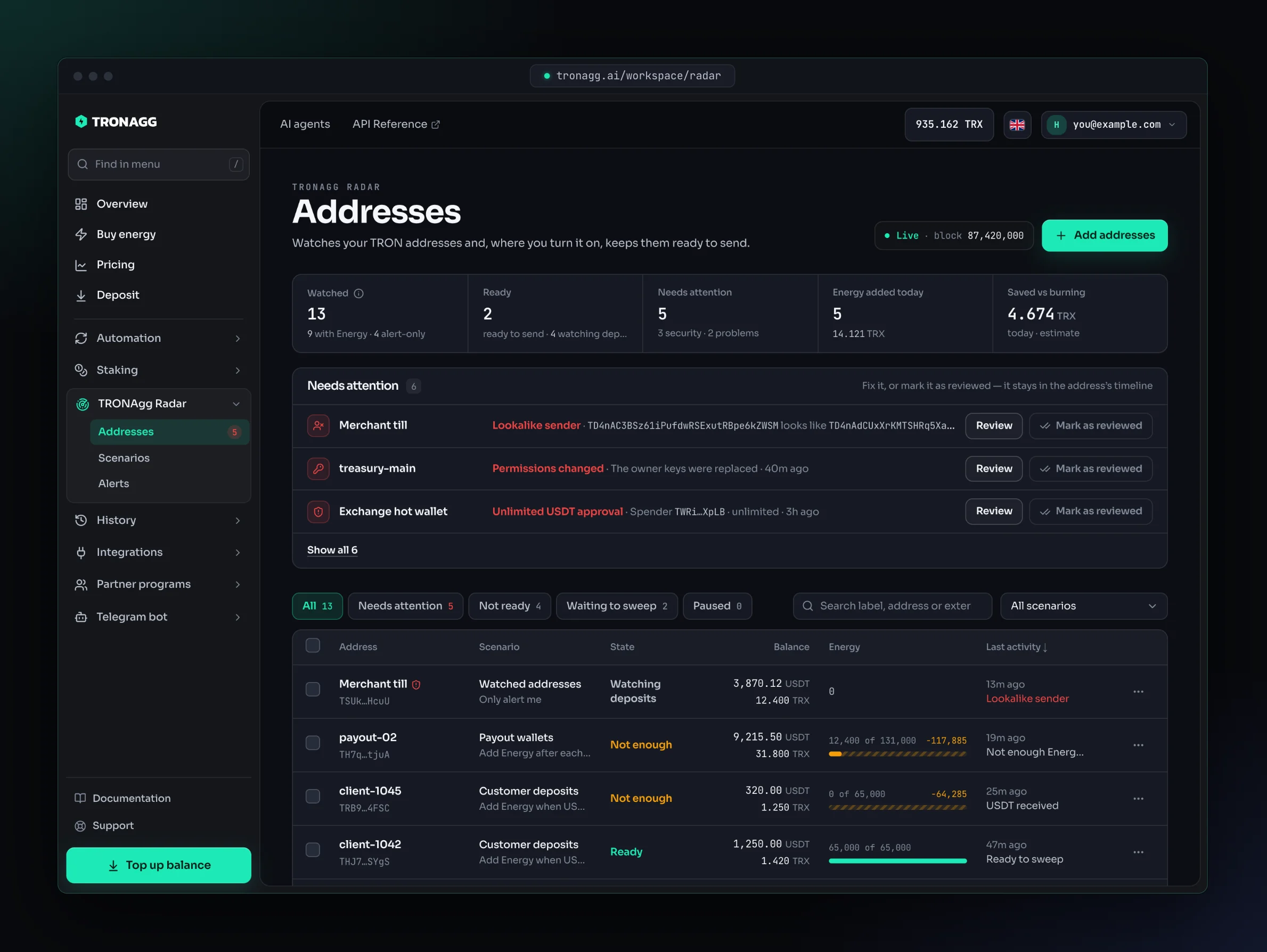
TRONAgg Radar → Addresses shows every address you watch: whether it can send its next transfer, what needs your attention, and which deposits are waiting to be swept. Click any address to open its page with the full timeline.
The top of the page
- Live · block N means Radar is keeping up with the TRON chain. If it falls more than 30 seconds behind, it says Delayed, and readiness is marked Not confirmed by fresh data until it catches up.
- Watched: how many addresses you watch, split into with Energy and alert-only. How the limits work shows how many of each your account can have.
- Ready: addresses ready to send their next transfer. Addresses you only watch are counted separately as watching deposits.
- Needs attention: how many addresses have a security alert or a problem.
- Energy added today: how many times Radar added Energy today and the TRX it spent. Saved vs burning: an estimate of the TRX your sweeps didn't burn today.
If your balance is getting too low for Radar to keep adding Energy, a banner says how many more additions it covers, with a Top up button. Watching and alerts never stop because of your balance.
Readiness
Each address shows one readiness state and an Energy meter (Energy 12,400 of 65,000):
| State | What it means | What to do |
|---|---|---|
| Ready | The address has Energy for one transfer of its scenario's preset, and its bandwidth is paid for. | Nothing: send when you're ready. |
| Not enough Energy | It has less Energy than its next USDT transfer needs. The meter shows how much is missing. | Wait for the scenario to add Energy, or press Add Energy. |
| Waiting for USDT | An Add Energy when USDT arrives address whose new deposits haven't reached its threshold yet. | Nothing: Radar adds Energy when deposits reach the threshold. |
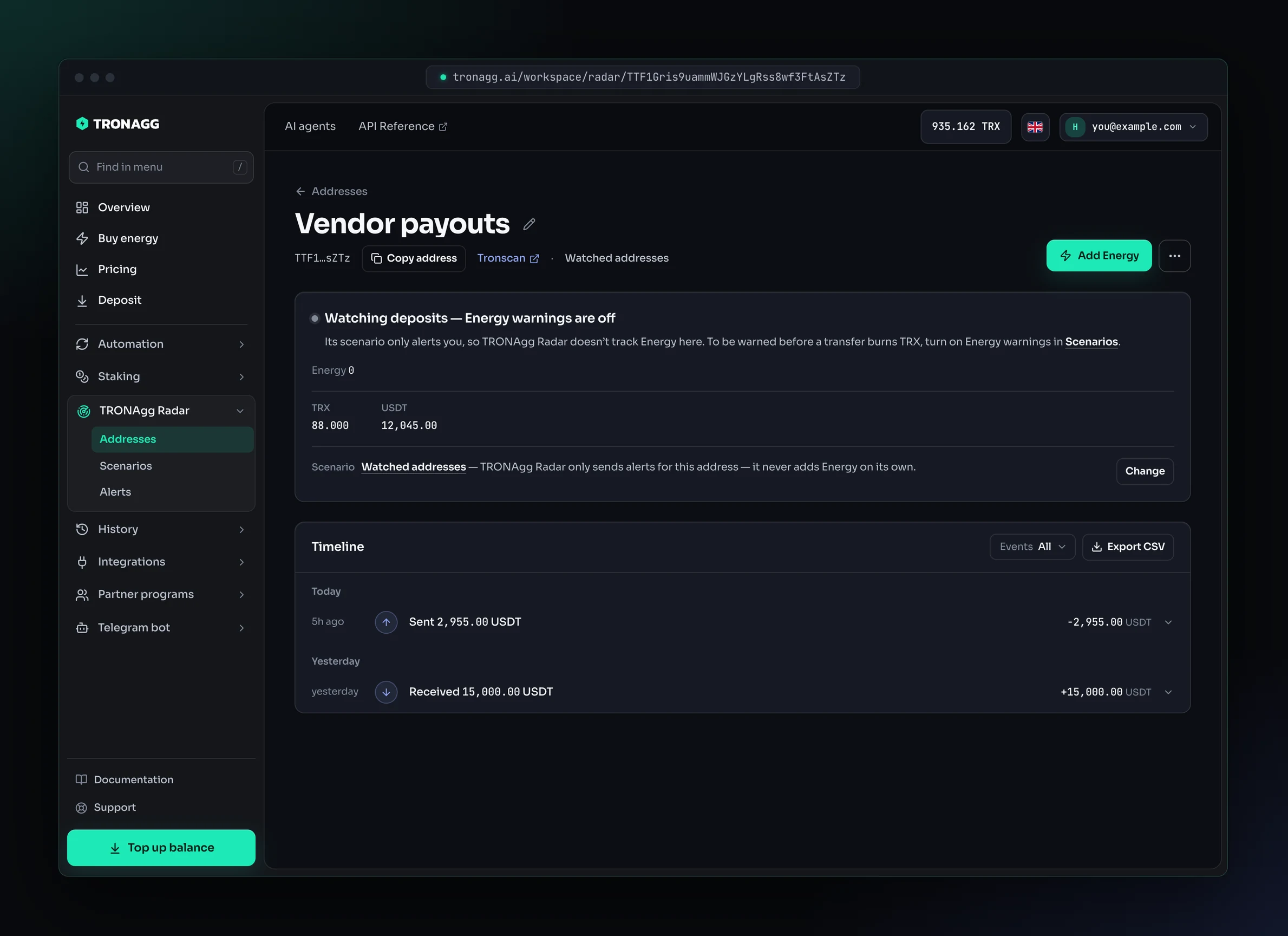
| Watching deposits | An Only alert me address with Energy warnings off. Radar watches deposits, transfers and security, but doesn't track Energy. | Nothing. To be warned before a transfer burns TRX, turn on Energy warnings. |
| Not activated | The address doesn't exist on TRON yet. | Nothing: the first Energy addition activates it. |
| Low TRX | It can't pay for its next transfer's bandwidth (or the extra 1 TRX of a multi-signature transfer). | Send it a little TRX, or wait for the free daily bandwidth to reset. |
| Frozen | The USDT issuer froze the USDT on this address. | Radar keeps watching but won't add Energy. See Security alerts. |
| Energy paused | You paused Energy for this address. | Resume Energy when you want Radar to add it again. |
| Checking… | Radar hasn't read the address from the chain yet. | Wait a moment. |
Ready is about Energy and bandwidth for one transfer of the preset. It isn't a promise that the transfer succeeds, and Radar doesn't check who you send to. See Energy per charge.
An address you only watch, with Energy warnings off, shows Watching deposits and the Energy it holds, with no meter and no warning:
Needs attention
Addresses with something to look at are listed at the top of the page, security first:
- Security: permissions changed, a USDT approval, USDT frozen by the issuer, a lookalike address.
- Problems: not enough Energy, not enough TRX for bandwidth, TRX burned on a transfer, a failed transfer, USDT below your low-USDT alert.
Each item says what happened and offers the next step: Add Energy with its current price, Copy address (to send it TRX), Review for security alerts, or Open for the address page.
Mark as reviewed takes an item off the list once you've dealt with it. It doesn't fix anything by itself, and the alert stays in the address's timeline. Not enough Energy and Low TRX items also leave the list by themselves as soon as the address has enough again. An address you only watch, with Energy warnings off, is never listed for Energy or TRX.
When nothing needs attention, the block shrinks to one line: All N addresses are ready.
Find addresses
- All, Needs attention, Not ready, Waiting to sweep and Paused filter the list. Not ready means Not enough Energy, Not activated, Low TRX, Frozen or Checking; addresses that are waiting for USDT, watching deposits or paused don't count as not ready.
- Search by label, address or external ID.
- All scenarios narrows the list to one scenario.
Waiting to sweep
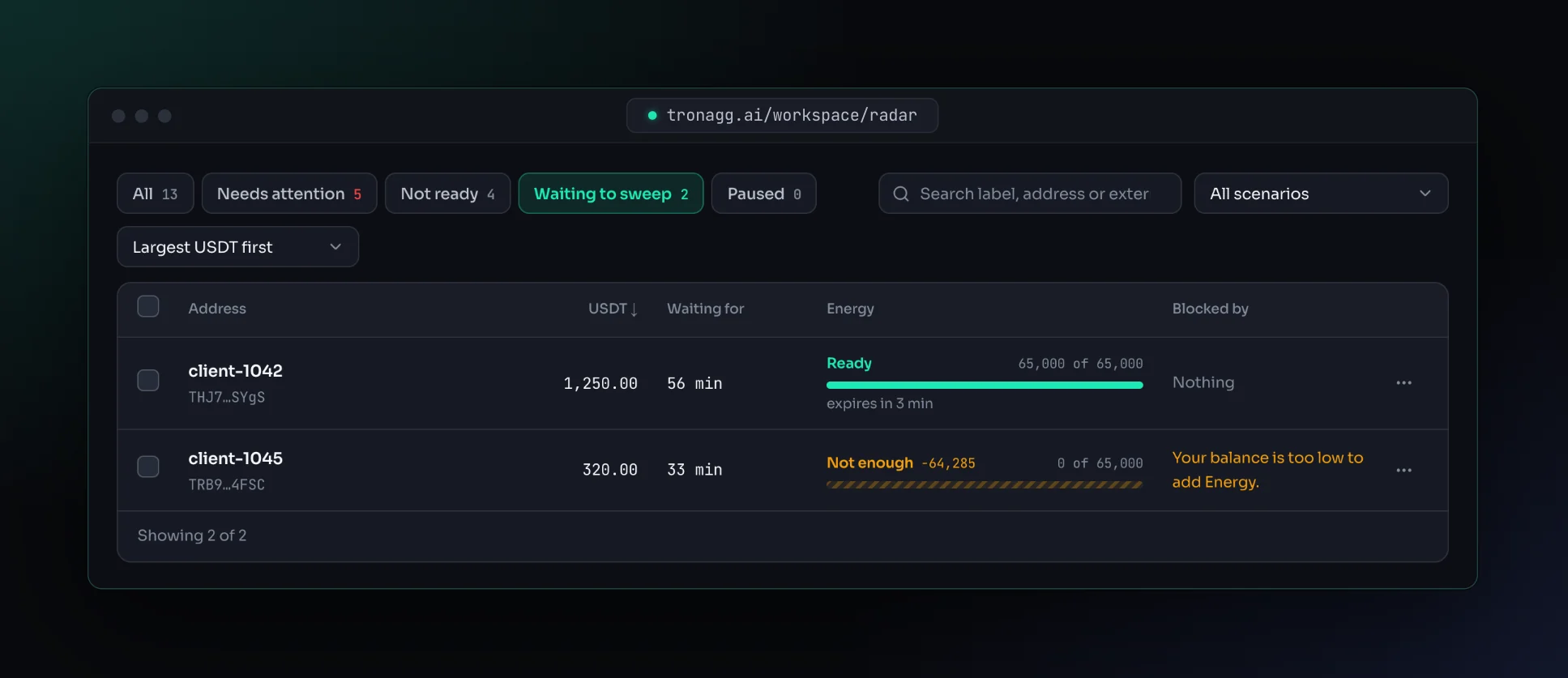
On Add Energy when USDT arrives scenarios, every address whose deposits reached the threshold and that hasn't been swept yet is waiting to sweep. This filter is your sweep queue:
- Waiting for: how long since the deposits reached the threshold.
- USDT: the address's current USDT balance, the amount to sweep.
- Energy: ready, with when it expires, or how much is still missing.
- Blocked by: what stops Radar from adding Energy, if anything: your balance, the daily budget, working hours, bandwidth, a freeze, or Nothing.
Sort the queue by Largest USDT first or Waiting longest first.
Act on many addresses
Tick addresses, or Select all N matching the current filter, then:
- Move to scenario
- Pause Energy or Resume Energy
- Export CSV
- Stop monitoring
Large selections run in batches of 1,000 with a progress bar; if some addresses fail, Retry failed runs only those. Most changes show an Undo for a few seconds.
Each row's ⋯ menu has the same actions for one address, plus Add Energy and Rename.
The address page
The address page has everything about one address.
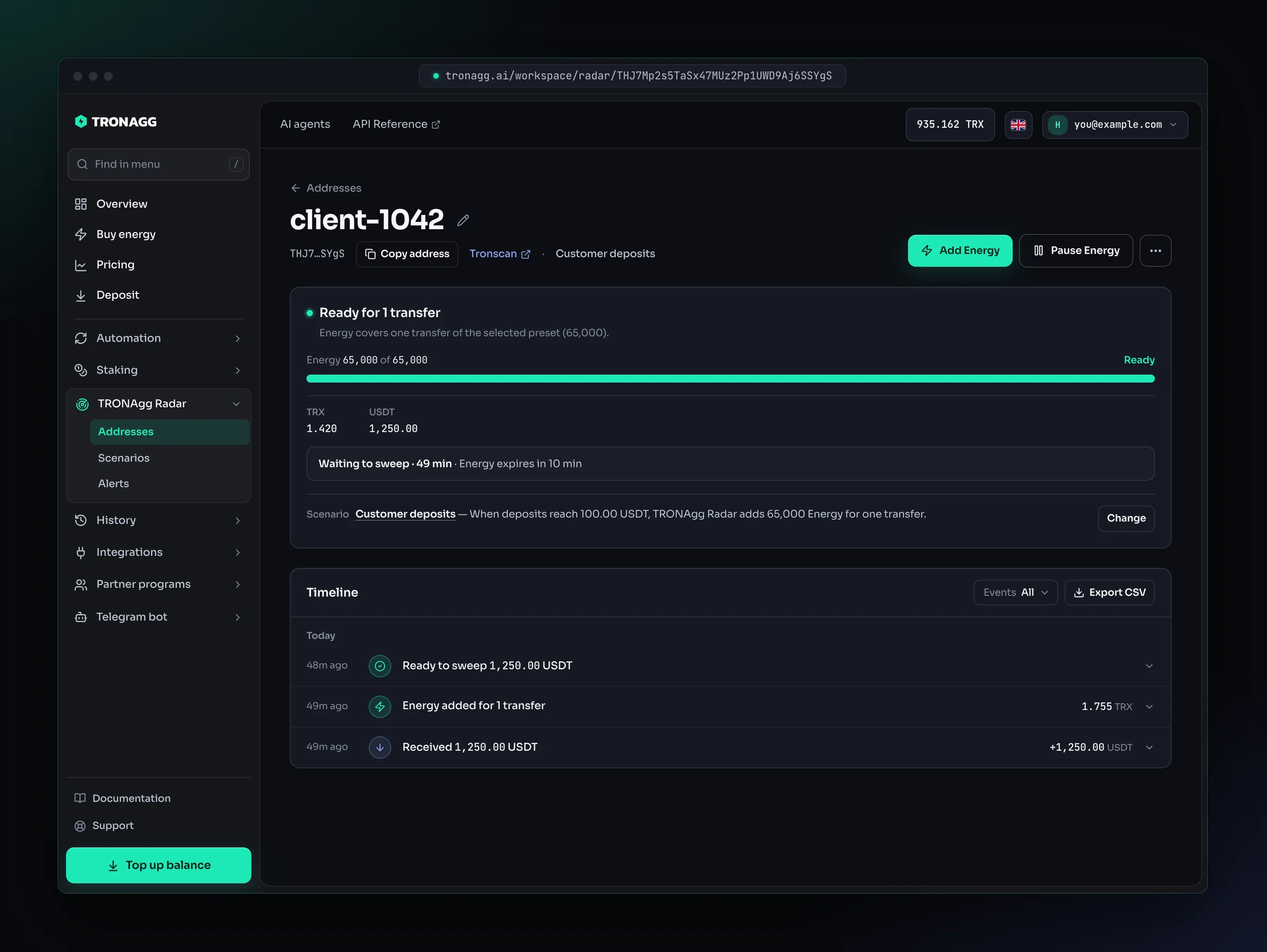
- Header: the label (click the pencil to rename it; an empty label shows the short address), Copy address, a Tronscan link, the scenario and the external ID. The buttons: Add Energy, Pause Energy or Resume Energy, and the ⋯ menu with Change scenario and Stop monitoring.
- Status: one card with the address as it is now:
- the state in words, for example Ready for 1 transfer or Waiting for USDT, and why Radar isn't adding Energy if it can't (your balance, the daily budget, today's limit, working hours, bandwidth, a freeze, a pause);
- the Energy meter;
- the TRX and USDT balances;
- Not activated or Frozen by the issuer, only when the address is;
- while a deposit waits to be swept, one line: Waiting to sweep and for how long, when Radar's Energy expires, and what's blocking Radar, if anything;
- at the bottom, the scenario: its name, its rule in one sentence and Change to move the address to another scenario. When the address has used up today's additions, or the scenario its budget, a warning line says so.
- Needs attention: this address's open items, each with Mark as reviewed.
- Timeline: everything that happened on the address, see Timeline.
The price of an addition, today's additions and spend against the budget, working hours and where the alerts go are on the scenario's card under Scenarios.
Timeline
The timeline lists everything that happened on the address and everything Radar did, newest first, grouped by day, for the last 90 days:
- deposits and transfers, for example Received 1,250.00 USDT or Sent 1,250.00 USDT with Energy — saved 4.674 TRX (estimate);
- Ready to sweep, Energy added for 1 transfer, Energy not added and why;
- problems and security alerts.
Filter it by Deposits, Energy, Problems or Security, and download it with Export CSV.
Open a line to see its details: sender or recipient, balances, Energy, the block, the transaction (with a Tronscan link) and its finality. Not final yet means the block can still be rolled back; Confirmed means it's final. A rolled-back event says so.
Under What TRONAgg Radar did you see the whole chain of one alert: when Radar saw it, what it decided about Energy (automatic or manual, how much, the price, the result) and every delivery: Sent, Failed, Waiting to send, Folded into a digest or Channel switched off, with attempts, the webhook's HTTP status and latency. Resend sends it again to one channel or to every channel of the scenario.
Add Energy
Add Energy buys Energy for the address's next transfer right now, in any scenario, including Only alert me. You'll find it in the header of the address page, in each row's ⋯ menu, and next to every Not enough Energy item under Needs attention.
- Choose how much the next transfer needs: 65,000 Energy (one USDT transfer to a wallet that already holds USDT) or 131,000 Energy (one USDT transfer to a wallet with no USDT; TRON charges double). Radar suggests the scenario's preset.
- Check the price. Radar quotes only the Energy that's missing, at this hour's rate; a new address shows the one-time activation separately.
- Confirm. The Energy usually lands within seconds, and the timeline shows the addition.
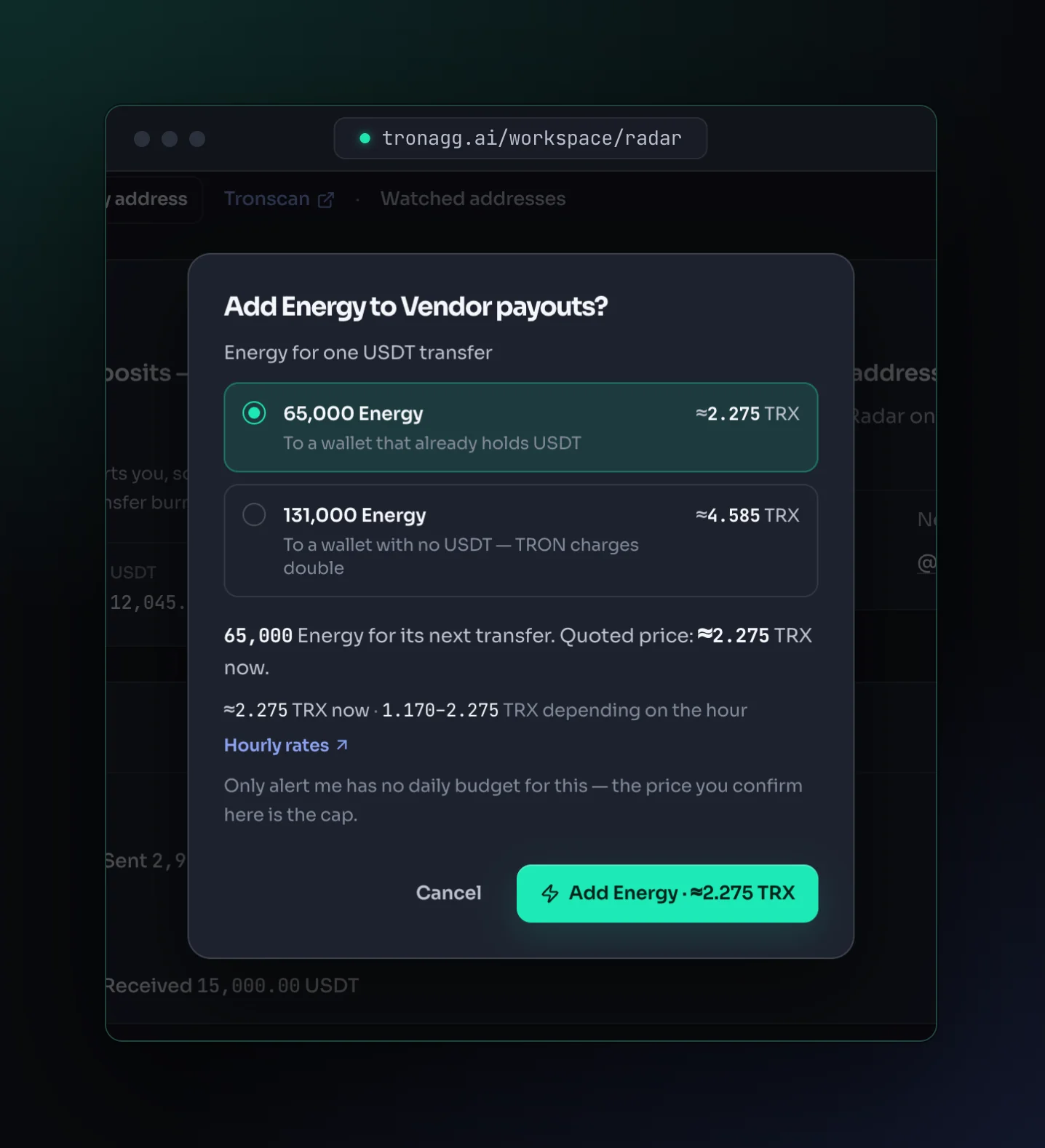
The rules that keep spending safe still apply:
- The price you confirm is a ceiling. If it went up before you confirmed, nothing is charged and you see the new price.
- It counts toward the scenario's TRX a day budget, but not toward its times per address a day. Only alert me scenarios never buy by themselves and have no budget: there, the price you confirm is the cap.
- It waits for the scenario's working hours, if it has them.
- Radar checks the address on the chain first. It won't buy for an address that already has enough Energy, is frozen, is a contract, can't pay its bandwidth, or already has Energy on the way.
- Not enough balance? The dialog says how much you need and offers Top up.
Add Energy is unavailable while the address is frozen, while its Energy is paused, and while an addition is already on its way. In the list it's also unavailable once the scenario's budget for today is used up.
Pause Energy or stop monitoring
- Pause Energy stops Radar from buying Energy for the address. Alerts and security alerts keep working, and the address keeps its place in your limit. Resume Energy lets Radar add Energy again whenever the scenario calls for it; a waiting deposit is picked up right away.
- Stop monitoring removes the address from Radar: no more alerts, no more Energy. Its timeline stays available for 90 days, its external ID is freed, and you can add it back at any time.
In the Telegram bot
In @tronagg_bot, ☰ More → 📡 TRONAgg Radar lists your addresses with their readiness and USDT balance. Open one to see its card: readiness, balances, scenario and last event, with Pause Energy, Resume and Stop monitoring.