Scenarios
A scenario is what TRONAgg Radar does for a group of addresses: one action, the Energy it adds each time, its limits and where its alerts go. Every watched address sits in exactly one scenario. You'll find them under TRONAgg Radar → Scenarios.
- One scenario usually covers many addresses: Deposit addresses for 2,000 of them, Payout wallets for five.
- A change applies to every address in the scenario right away, and is logged.
- You can move any address to another scenario at any time.
Each scenario card shows its rule in one line (for example When deposits reach 100.00 USDT → add 65,000 Energy), how many addresses use it, the price of one addition right now, what it has spent today against its budget, its working hours and where its alerts go.
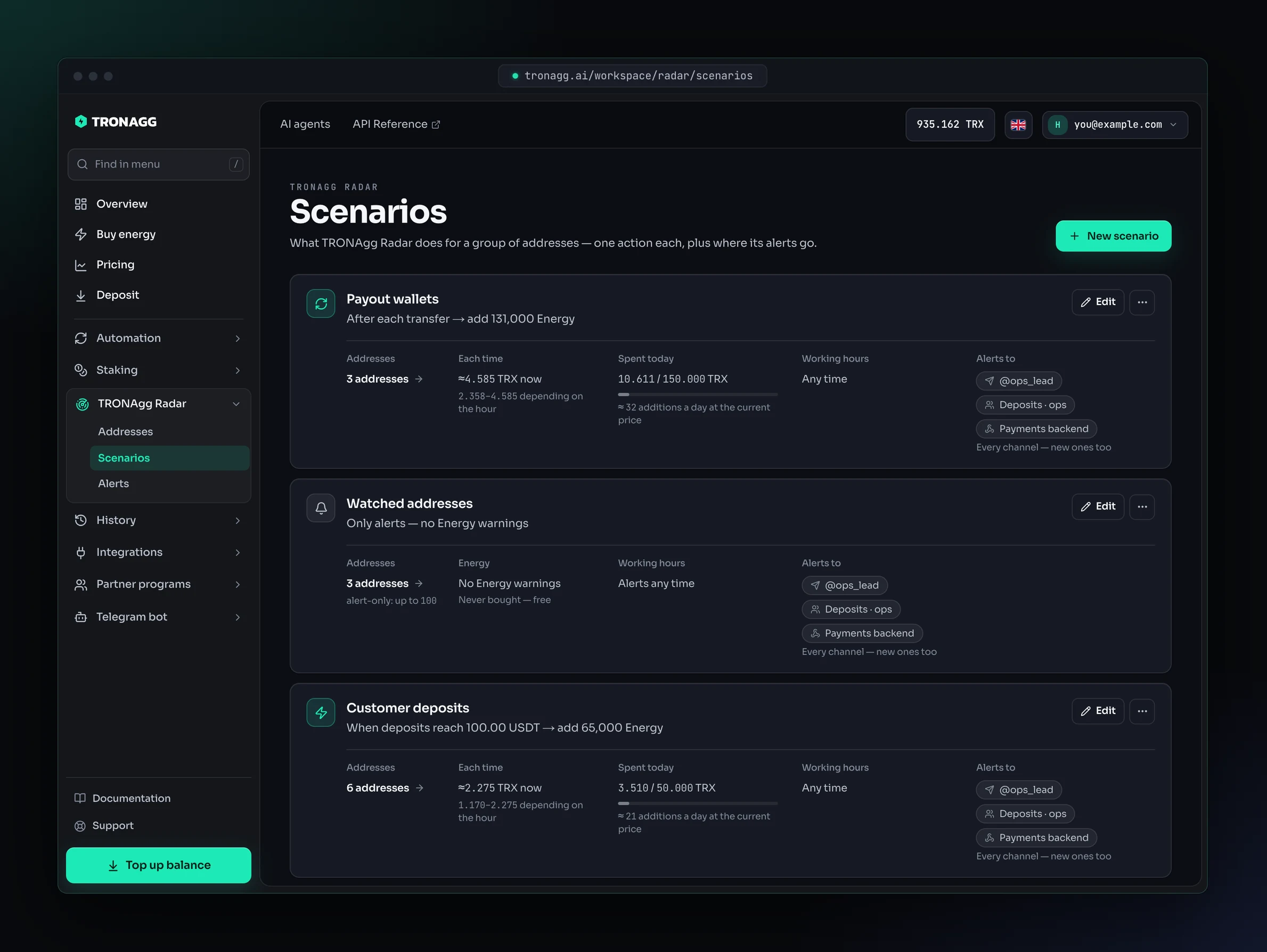
The three actions
Only alert me
Radar watches and alerts. It never buys Energy, and it's free for up to 100 addresses.
Every address in an Only alert me scenario gets:
- Deposits & transfers: USDT and TRX in and out.
- Security: permissions changed, USDT approvals, issuer freezes, lookalike addresses.
- TRX burned and Transfer failed, when one of its own transfers burns TRX or fails.
- The low-USDT alert, if you set one.
Energy warnings
An address you only watch doesn't need Energy, so by default Radar doesn't track it. If you'd like to know before one of these addresses sends a transfer that would burn TRX, turn on Warn when an address can't send without burning TRX.
| Warnings off (default) | Warnings on | |
|---|---|---|
| Readiness on the address | Watching deposits | Ready, Not enough Energy, Low TRX… |
| Not enough Energy alert | Never | When the address has less Energy than its next USDT transfer needs |
| Not enough TRX for bandwidth alert | Never | When it can't pay for its next transfer's bandwidth |
| Listed under Needs attention for Energy or TRX | Never | While it's short |
| Deposits, transfers, security, TRX burned, failed transfers | Yes | Yes |
With warnings on, pick Warn when Energy is below: 65,000 (sending USDT to a wallet that already holds USDT), 131,000 (sending USDT to a wallet with no USDT; TRON charges double), or a custom amount. See Energy per charge.
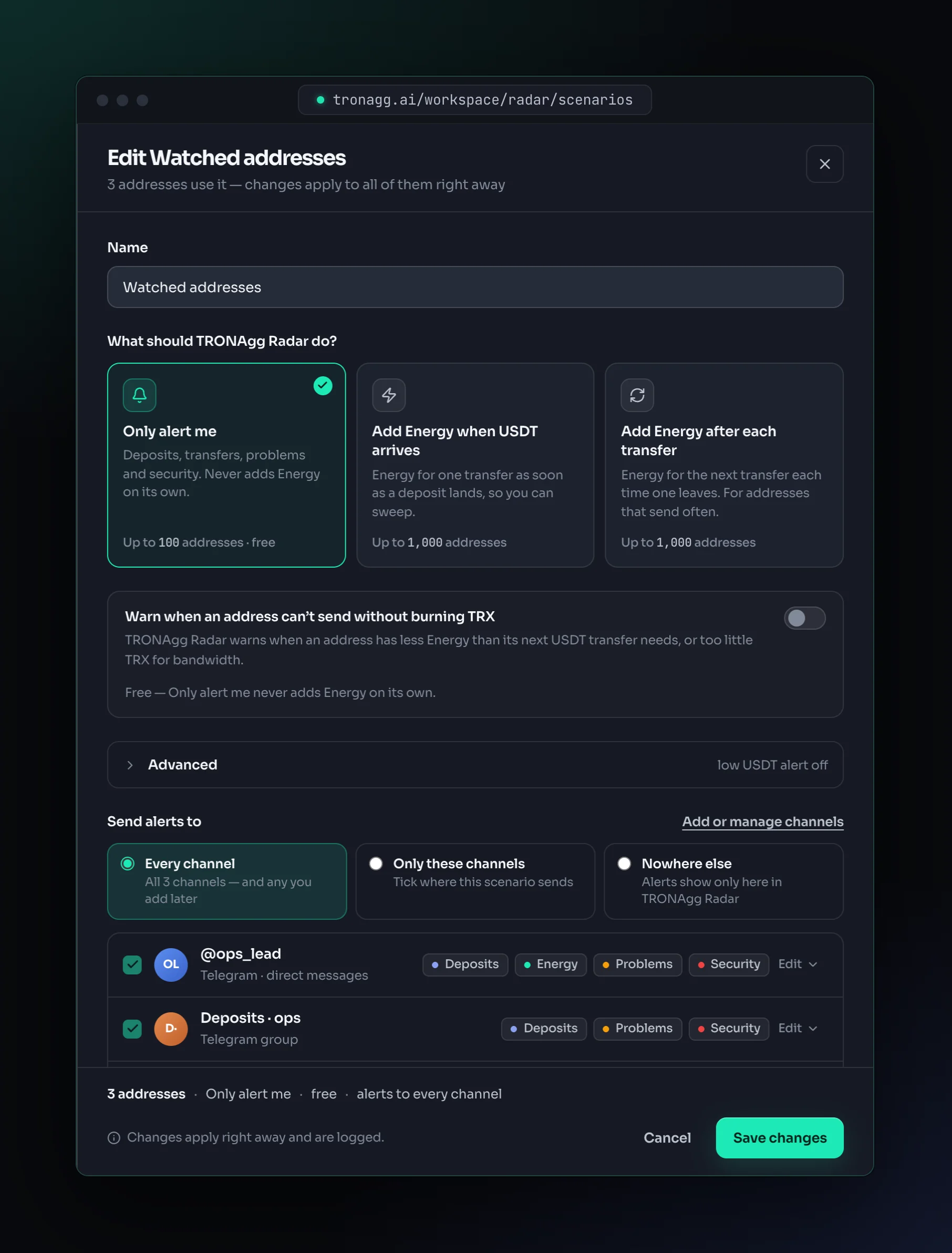
Even on Only alert me, you can buy Energy for one transfer by hand: Add Energy on the address page.
Add Energy when USDT arrives
For deposit addresses that you empty after a payment arrives: an exchange, a payment gateway, a merchant.
- USDT deposits add up to your threshold. Radar counts only USDT that arrives after the address joins the scenario and isn't swept yet.
- Radar opens a deposit on the address. You'll see it in Waiting to sweep.
- Radar checks the address on the chain again, then your daily budget and your balance, and adds Energy for one transfer. If the address already has enough Energy, Radar adds nothing.
- As soon as the address has Energy for one transfer, isn't frozen and can pay its bandwidth, you get Ready to sweep.
- You sign and send the sweep. When Radar sees USDT leave the address, or the balance falls below the threshold, the deposit is closed. The next one opens when new deposits reach the threshold again.
Good to know:
- One Energy addition per deposit. While a deposit is open, more deposits don't add more Energy to it: they count toward the next one if the sweep leaves them on the address. Dust and split payments can't drain your budget.
- Partial sweeps. Any USDT sent from the address closes its deposit. USDT that was on the address before doesn't open a new one; USDT that arrived while Radar was waiting for the sweep still counts if the sweep leaves it behind.
- Energy lasts one hour. If the sweep doesn't happen in time, you get Energy expired before the sweep. Turn on If the sweep doesn't happen within 1 hour, add Energy again (under Advanced) to have Radar add it once more: once per deposit, and only if the address still needs it.
- USDT already on the address doesn't count. An address that holds USDT when you add it, or move it into the scenario, gets no Energy for that balance. Radar waits for new deposits to reach the threshold.
- Empty deposit addresses are not a problem. Until a deposit arrives, an address shows Waiting for USDT, never Not enough Energy.
- New addresses. A USDT deposit doesn't activate a TRON address. Radar's first Energy addition activates it, for a one-time fee added to that first addition.
Add Energy after each transfer
For payout and hot wallets that send USDT often.
- After each transfer from the address that used Energy, including a smart-contract call that sent TRX (a swap, for example), Radar adds Energy for the next one.
- Radar doesn't add Energy before the first transfer. A wallet with no Energy shows Not enough Energy: press Add Energy on its page once, and from then on Radar refills after every transfer.
- Energy can't be added to a transfer that has already been sent. A transfer sent before the refill lands pays in TRX, so leave a moment between transfers or check the address is Ready first.
- Radar warns you when the wallet doesn't have enough Energy or TRX for its next transfer.
Energy per charge: 65,000 or 131,000
A USDT transfer on TRON is paid for with Energy; without enough Energy, the network burns TRX from the sender instead. How much Energy the transfer needs depends on the recipient:
- about 64,285 Energy if the recipient already holds USDT;
- about 130,285 Energy if the recipient holds no USDT. TRON charges about double, because the transfer creates the recipient's USDT balance.
So a scenario picks how much Energy one addition covers:
| Energy each time | Covers one USDT transfer to | Pick it when |
|---|---|---|
| 65,000 (default) | a wallet that already holds USDT | You sweep to your own hot wallet, or pay wallets that hold USDT. |
| 131,000 | any wallet, including one with no USDT | Recipients may be new or empty wallets, such as payouts to customers. |
| Custom | exactly the amount you enter | You know what your transfers need. |
Ready means the address has Energy for one transfer of the scenario's preset. Radar doesn't know who you'll send to: if a scenario uses 65,000 and you send to a wallet with no USDT, the transfer needs about twice as much and burns TRX for the rest.
Radar only buys what's missing for the next transfer, rounded up to the next 1,000 Energy and never below the minimum order size. For example, on the 131,000 preset, an address that still has 65,000 Energy gets 66,000 more.
USDT threshold
Add Energy when deposits reach sets how much USDT has to arrive before a deposit address needs Energy: 10, 50, 100 (the default) or your own amount, with up to six decimals.
Counts USDT that arrives after the address joins the scenario and isn't swept yet. USDT already on the address doesn't count.
Deposits add up: with a 100 USDT threshold, three deposits of 40 USDT trigger one Energy addition, at the third deposit. When Radar opens a deposit, the count starts again from zero. A sweep uses up the USDT its deposit covered first, then newer deposits, never USDT that was on the address before: USDT that arrives while Radar is waiting for the sweep still counts if the sweep leaves it behind, while what's left of older USDT never triggers an addition by itself. Other USDT sent from the address takes the amount it sends off the count, and sending USDT from the address to itself doesn't change it.
Pick a threshold below which a sweep isn't worth its cost to you.
The Energy settings and Advanced in the scenario form hold the limits below.
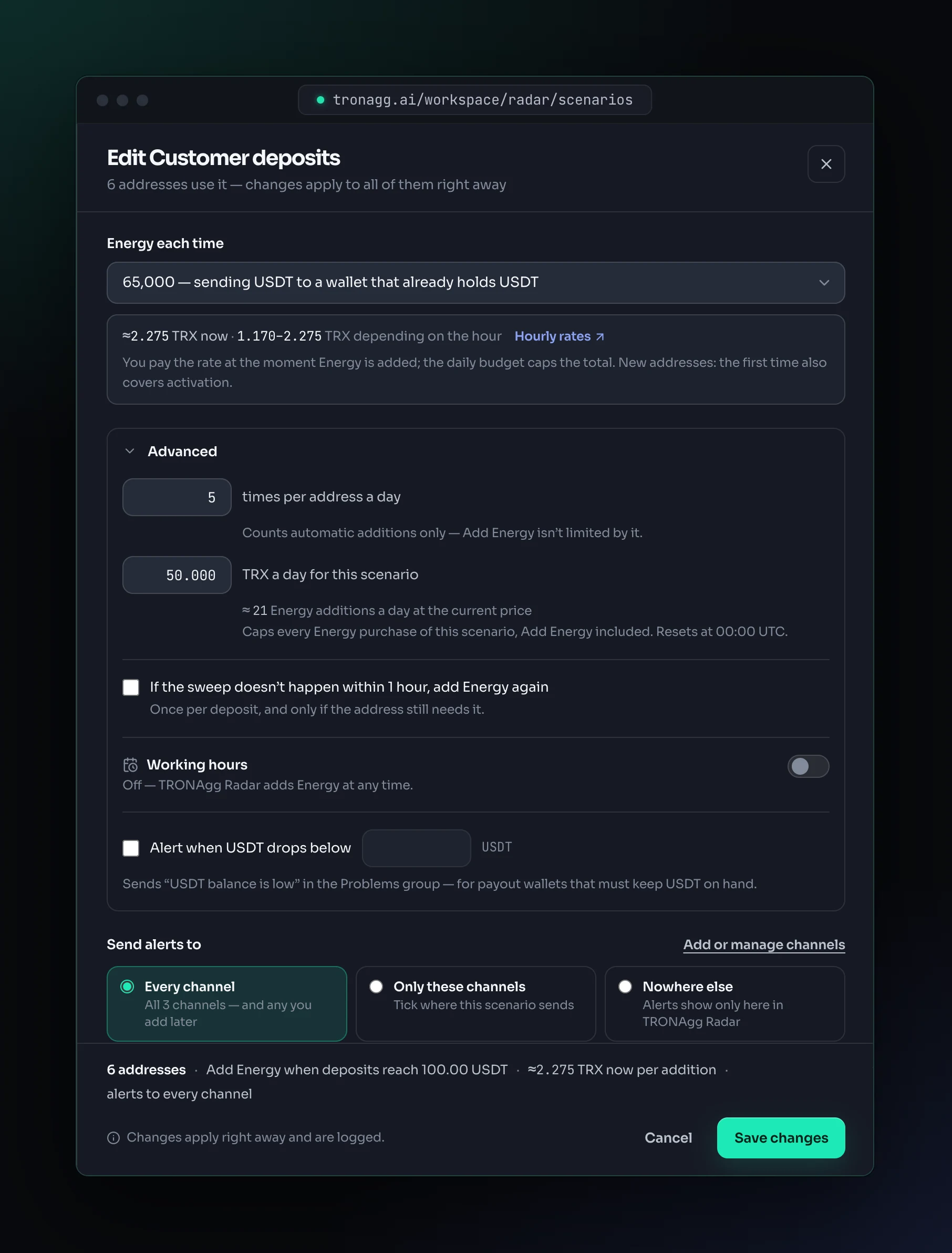
Times per address a day
How many times Radar may add Energy automatically to one address in a day: 5 by default, from 1 to 1,000. The count resets at 00:00 UTC.
Add Energy by hand isn't limited by it. When an address reaches the limit, Radar tells you with Energy not added, and its page says so.
Daily budget
TRX a day for this scenario caps every Energy purchase of the scenario, automatic or by hand: 50 TRX by default, from 1 to 1,000,000 TRX. Purchases in progress count against it, and it resets at 00:00 UTC. Only alert me scenarios never buy by themselves and have no budget: an Add Energy there is capped by the price you confirm.
The scenario card shows what it spent today against the budget, and roughly how many additions the budget buys at the current price. When the budget is used up, Radar stops adding Energy for the scenario, tells you with Energy not added, and picks the waiting addresses up again at 00:00 UTC or as soon as you raise the budget.
Working hours
Turn on Add Energy only during working hours to limit when Radar spends: pick the days, the hours and a time zone (yours by default). Hours can run past midnight, for example 22:00–06:00.
Choose what happens to Energy outside working hours:
- Alert only (the default): Radar tells you about the deposit or transfer and adds nothing.
- Add Energy when hours start: when the hours start, Radar checks the address again and adds Energy only if it's still needed.
Alerts always arrive, at any hour. Add Energy by hand also waits for the working hours.
Low-USDT alert
Alert when USDT drops below sends USDT balance is low (in the Problems group) when an address's USDT balance falls below the amount you set. It's meant for payout wallets that must keep USDT on hand, and works with every action.
It fires once when the balance drops below, and again only after the balance has gone back above it and dropped again.
Where the alerts go
Each scenario chooses its channels:
- Every channel: all your channels, including ones you connect later.
- Only these channels: the ones you tick.
- Nowhere else: no Telegram messages and no webhook calls. Alerts stay in Radar's timeline.
Which alert groups each channel receives is set on the channel itself, in Alerts, and is the same for every scenario that sends to it.
Changing, moving and deleting
- Edit a scenario from its card. Changes apply to all of its addresses at once.
- Changing the action closes the addresses' open deposits and cancels Energy additions that were waiting. If the addresses move between the alert-only and the Energy limit, all of them must fit in the new one.
- Move addresses from the Addresses list (Move to scenario) or from an address page (Change next to its scenario, or Change scenario in the ⋯ menu). In an Add Energy when USDT arrives scenario, an address that's moved in starts counting deposits from the move: the USDT it already holds doesn't count.
- Delete a scenario from its menu. One without addresses goes right away; for one with addresses, Radar asks which scenario to move them to first. Their alerts then follow the new scenario's channels.
Scenario names are unique per account and up to 80 characters.
Defaults
| Setting | Default | Range |
|---|---|---|
| USDT threshold (Add Energy when USDT arrives) | 100 USDT | above 0, up to 6 decimals |
| Energy each time | 65,000 | 65,000, 131,000 or custom |
| Times per address a day (automatic) | 5 | 1–1,000 |
| TRX a day for the scenario | 50 TRX | 1–1,000,000 TRX |
| Add Energy again if not swept within 1 hour | Off | On or off |
| Working hours | Off: any time | Days, hours, time zone |
| Low-USDT alert | Off | Any USDT amount |
| Energy warnings (Only alert me) | Off | On or off |
| Send alerts to | Every channel | Every channel, only these channels, nowhere else |