Alerts
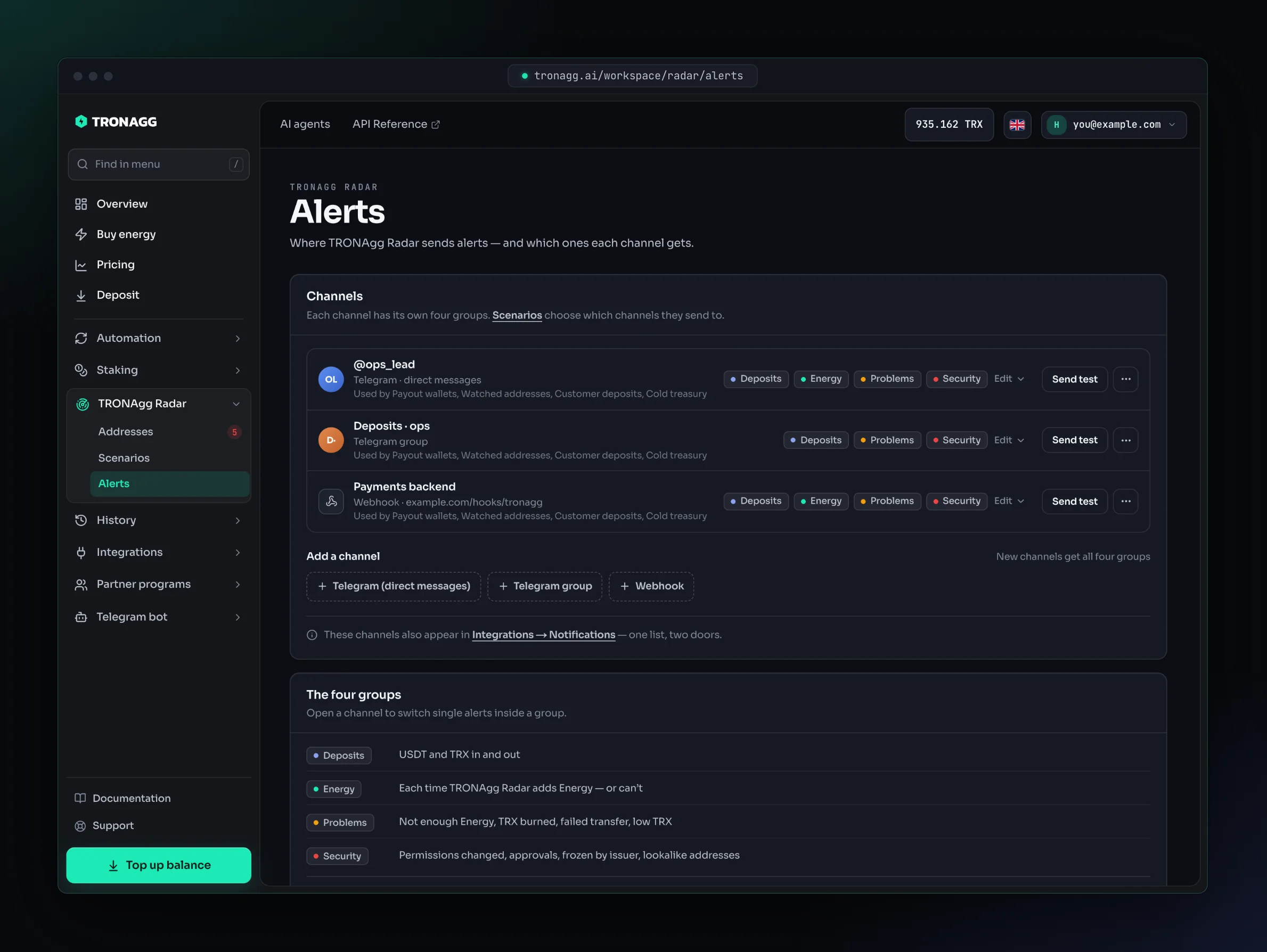
TRONAgg Radar sends its alerts to Telegram or to your server, usually within seconds of the block. Every alert also stays in the address's timeline, whether it was sent anywhere or not. You set it all up under TRONAgg Radar → Alerts.
Channels
| Channel | Best for | How to connect |
|---|---|---|
| Telegram (direct messages) | You. Alerts arrive in your chat with @tronagg_bot, with buttons to add Energy or mute an address. | Add a channel → Telegram (direct messages), confirm the Telegram login in the tab that opens, then come back. |
| Telegram group | Your team: operations, treasury, support. | Add a channel → Telegram group. Step by step. |
| Webhook | Your backend. A signed JSON POST per alert. | Add a channel → Webhook: a name and an HTTPS URL. Requirements. |
These are the same channels you see in Integrations → Notifications: one list, two doors. Disconnect removes a channel from both.
Each channel row shows which scenarios send to it and its last delivery. Send test sends a test alert there.
Connect a Telegram group
- Automatic: press Open Telegram & pick a group and choose the group. Telegram adds the TRONAgg notifications bot and posts your connection code there. Come back to the page: it notices the connection by itself.
- Manual, if Telegram is open on another device: add the bot shown on the page to the group, then send the
/bindcommand the page gives you as a message in the group. The bot replies when the group is connected.
The connection code expires after a few minutes; generate a new one if it lapses.
Connect a webhook
- Use an HTTPS URL on a public host that answers
2xxwithin 10 seconds. Redirects aren't followed. - Copy the signing secret when it's shown: it's shown only once. Use it to verify every delivery.
- Creating a webhook needs more than 1 TRX of confirmed deposits on your account; a Google sign-in alone isn't enough for webhooks.
- An account can have up to 10 webhooks.
- A failed delivery is retried up to 4 more times over about 2.5 hours. Missed one anyway? Replay it from the event feed.
The full rules are in Webhooks & Notifications.
Which alerts go where
Two settings decide where an alert goes:
- The scenario chooses the channels: every channel, only the ones you tick, or nowhere outside Radar. See Where the alerts go.
- The channel chooses which of the four alert groups it receives. This choice belongs to the channel, so every scenario that sends there gets the same.
So a team group can receive only Deposits & transfers while your webhook receives everything.
The four alert groups
| Group | Alerts |
|---|---|
| Deposits & transfers | USDT received, USDT sent (from 1 USDT), TRX received, TRX sent (from 10 TRX). TRX includes transfers made by smart contracts (internal transfers) and TRX sent with a contract call. |
| Energy added | Ready to sweep, Energy added, Energy not added, Energy order failed, Energy expired before the sweep. |
| Problems | Not enough Energy for the next transfer, not enough TRX for bandwidth or a multi-signature transfer, TRX burned on a transfer, transfer failed, USDT balance is low. |
| Security | Permissions changed, USDT approval, USDT frozen or unfrozen by the issuer, lookalike address. |
A new channel receives all four groups. Change a channel's groups with Edit, and open the channel to switch single alerts inside a group, for example to keep USDT received but drop TRX sent.
Digest for busy chats
A Telegram chat that would get more than 10 Radar alerts within a minute receives the rest as one summary message instead: deposits and transfers with their totals, Energy added, addresses ready to sweep, and up to three addresses that need attention.
- The individual alerts are still in each address's timeline, marked Folded into a digest.
- Permission changes, issuer freezes and unlimited USDT approvals never fold: each one arrives on its own.
- Webhooks never fold: each alert is its own event.
- Prefer every message? Switch off Fold into a digest when busy on the channel.
Buttons in Telegram
- Every alert has Open in TRONAgg Radar, which opens the address page.
- In your private chat with @tronagg_bot, Not enough Energy alerts also have ⚡ Add Energy now. The bot shows the Energy and the current price; the price is checked again when you confirm, and if it went up, nothing is charged.
- Deposit alerts and Not enough Energy alerts in your private chat have Mute 1h. It silences every Radar alert about that address in that chat for an hour, security alerts included. Your other chats, your webhooks and the timeline are not affected.
When alerts fire
- Usually within seconds of the block, but no delivery time is guaranteed. Act on the alert, never on a timer.
- Deposits & transfers fire for each transfer of at least 1 USDT or 10 TRX. Zero-value transfers and fake tokens never count as deposits.
- Not enough Energy, not enough TRX and USDT balance is low fire once when the problem starts, and again only after it has cleared and come back. They're not repeated reminders.
- Energy not added is sent at most once an hour per scenario and reason, so a used-up budget or an empty balance doesn't flood your chat. Every waiting address shows the reason on its page.
- Energy warnings depend on the scenario. Add Energy when USDT arrives: only while a deposit waits to be swept. Add Energy after each transfer: whenever the wallet is short. Only alert me: only if you turned Energy warnings on. While Radar is adding Energy, it doesn't warn about missing Energy.
- Only new activity. Radar alerts on what happens after you add an address.
- Alerts come from the newest block. Very rarely, the network rolls a block back. Radar doesn't send a second message when a block becomes final; the timeline and the API show whether an event is final or was rolled back.
What each alert says
Telegram alerts start with the address's label (or its short address), then one fact per line. Amounts, prices and addresses below are examples.
A deposit:
📡 TRONAgg Radar · deposit-0042
⬇️ +1,250.00 USDT from TYqHsa…ggvo
Balance 1,250.00 USDT
The address can sweep:
📡 TRONAgg Radar · deposit-0042
✅ Ready to sweep · 1,250.00 USDT
⚡ 65,000 Energy — covers one transfer (64,285)
Energy expires 19:05 UTC
Energy was added:
📡 TRONAgg Radar · deposit-0042
⚡ Energy added · 65,000 Energy · 1.755 TRX
Energy expires 19:05 UTC
Energy wasn't added, and why:
📡 TRONAgg Radar · deposit-0042
⏸ Energy not added
Reason: The scenario's daily TRX budget is used up
A payout wallet can't send its next transfer without burning TRX:
📡 TRONAgg Radar · payout-07
🔋 Not enough Energy for the next USDT transfer
Energy 12,400 of 64,285 · short 51,885
A transfer burned TRX:
📡 TRONAgg Radar · payout-07
🔥 A transfer burned 6.429 TRX for 64,285 Energy
Adding that Energy would have cost 1.755 TRX
A security change:
📡 TRONAgg Radar · treasury
🛡 Account permissions changed
Owner keys 1 → 2
tx 9c1f0e…a377
If this wasn't you, act now.
A busy chat's digest:
📡 TRONAgg Radar · last 1 min
⬇️ 37 deposits on 21 addresses · 12,430.00 USDT
⚡ Energy added on 21 addresses · 36.855 TRX
✅ Ready to sweep: 21 addresses
⚠ 1 needs attention: payout-07 — low Energy
Every alert
| Alert | When it fires | Group | Webhook event |
|---|---|---|---|
| USDT received / USDT sent | USDT arrives or leaves (from 1 USDT). | Deposits & transfers | address.usdt.received, address.usdt.sent |
| TRX received / TRX sent | TRX arrives or leaves (from 10 TRX). | Deposits & transfers | address.trx.received, address.trx.sent |
| Ready to sweep | A waiting deposit has Energy for one transfer, the address isn't frozen and its bandwidth is paid for. | Energy added | address.sweep.ready |
| Energy added | Radar's Energy arrived on the address, with what it cost. | Energy added | address.energy.charged |
| Energy not added | Radar didn't add Energy, with the reason (your balance, the budget, today's limit, working hours, a freeze, bandwidth…). | Energy added | address.charge.skipped |
| Energy order failed | The Energy order didn't complete. | Energy added | address.charge.failed |
| Energy expired before the sweep | Radar's Energy ran out (after one hour) before the deposit was swept. | Energy added | address.energy.expired |
| Not enough Energy for the next transfer | The address has less Energy than its next USDT transfer needs. | Problems | address.energy.insufficient |
| Not enough TRX for bandwidth or a multi-signature transfer | The next transfer's bandwidth (or the 1 TRX multi-signature fee) can't be paid. | Problems | address.trx.low |
| TRX burned on a transfer | A transfer from the address burned TRX for Energy, with what that Energy would have cost from Radar. | Problems | address.trx.burned |
| Transfer failed | A transfer from the address failed: out of Energy, or rejected by the contract. | Problems | address.tx.failed |
| USDT balance is low | The balance fell below your low-USDT alert. | Problems | address.usdt.low |
| Permissions changed | Who can sign for the address changed. | Security | address.permissions.changed |
| USDT approval | The address allowed another address to spend its USDT. | Security | address.usdt.approval |
| USDT frozen / unfrozen by the issuer | The USDT issuer froze or unfroze the address. | Security | address.usdt.frozen |
| Lookalike address | A transfer involved an address made to look like one this address deals with. | Security | address.poisoning.suspected |
What to do about each security alert: Security alerts. The webhook payload of every event: Developers.